How to read a liquidation heatmap
October 19, 2026
By Hyperdash
The Liquidations widget on Hyperdash shows the price at which every open position on a Hyperliquid market would be liquidated, and how much notional sits at each price. Every position on Hyperliquid is on-chain, so these levels are calculated from the positions themselves, not estimated from open interest and an assumed leverage as heatmaps on centralized exchanges have to.
In this article, we walk through how a liquidation level is calculated, the three views of the widget and how traders use it, using the S&P 500 perp (SP500) as the example throughout.
Published
October 19, 2026
Author
Hyperdash
Reading time
4 min read
Category
Tools & Data
How Liquidation Levels Work
A position is liquidated when its margin falls to the maintenance requirement. On Hyperliquid, maintenance margin is half the initial margin at the market's maximum leverage. SP500 trades at up to 50x, so maintenance is 1% of the position's value. A 10x long starts with margin equal to 10% of the position and is liquidated after a fall of roughly 9%, when the remaining margin reaches that 1%.
A liquidated long is closed with a market sell and a liquidated short with a market buy, so each level on the heatmap is an order that will hit the book if price reaches it.
Setting Up the Widget
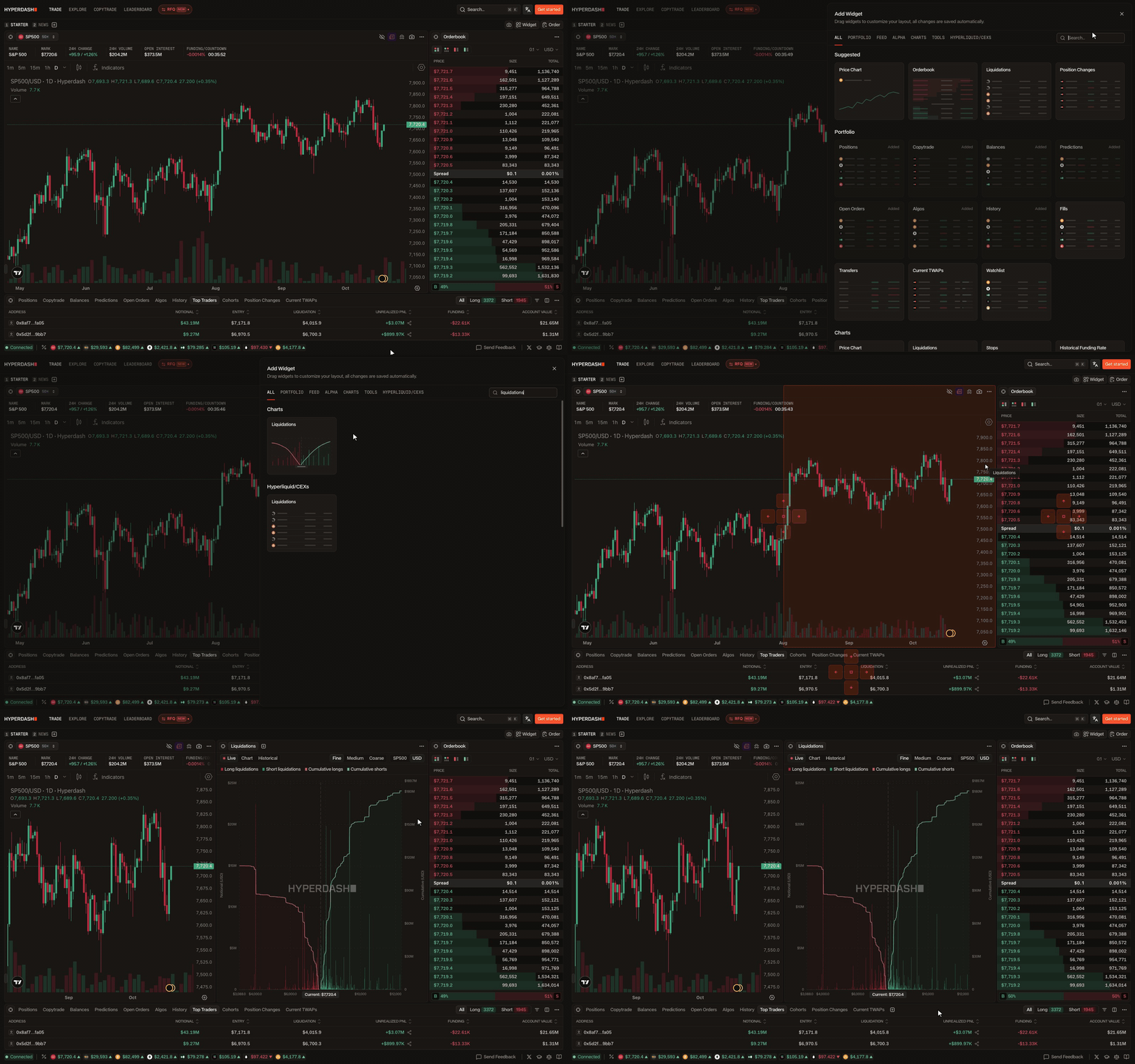
Open Widget, then Charts, and add Liquidations. The widget follows the selected market. Live, Chart and Historical switch between the three views. Fine, Medium and Coarse set the bucket size; on SP500, Fine groups levels into $10 ranges. The toggle on the right switches between contracts and USD.
The Live View

Live shows the current map. Long liquidations are the red bars below the current price, short liquidations are the green bars above it, and the two lines show the cumulative total moving away from price. On October 18th, 2026 at 9:21 PM EST, with SP500 at $7,697.6, there was $45.7M of long liquidations between the current price and $7,000, and another $4.3M in the $10 range just below $7,000.
Clicking a bar opens the positions inside it, sorted by size, with each one's liquidation price and distance from the current price.

At 12:25 AM EST on October 19th, the short bar between $8,040 and $8,050, 4.2% above price, held $19.8M across 23 positions. Almost all of it was a single wallet, a 2,426.96 contract short with a liquidation price of $8,043.80. A bar held by one wallet can disappear in one transaction if that trader adds margin or reduces size, so it is worth checking who holds a level before treating it as crowded.
The Chart View

Chart plots the same levels as horizontal bars on the right edge of a price chart, with timeframes from one second to one day. The tall green bar near $8,045 is the same short level opened in Live, shown against two days of hourly candles.
The Historical View
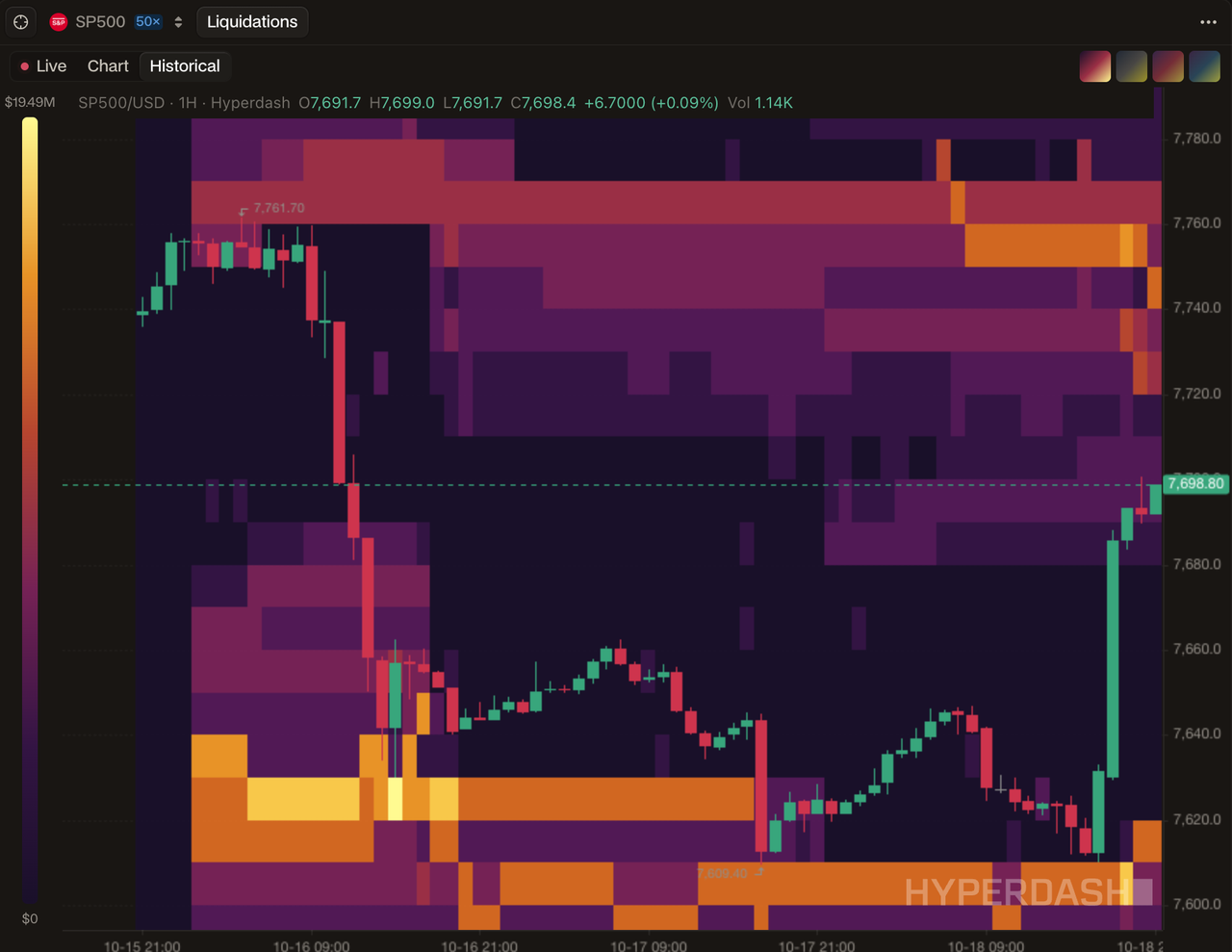
Historical shows how levels built up and cleared over time. Brighter colors mean more notional at that price, on a scale from $0 to the largest band in view, $19.49M in this example. After SP500 fell on October 16th, long levels built up between $7,620 and $7,630 and stayed there into October 17th. Price then traded down to $7,609.40 and the band cleared, as those positions were liquidated, topped up or closed.
When to Use It
Before opening a leveraged position, the widget shows whether the planned liquidation price would sit inside a large band, where a move to that price would close the position along with every other position there. The same check applies to stop placement, and the Stops widget, in the same menu, maps resting stop-loss and take-profit orders by price in the same way.
When price approaches a large band, the widget shows how much forced selling or buying is waiting there. Long levels below price become market sells and short levels above price become market buys. After a sharp move, Historical shows whether the bands near price were cleared or are still in place.
Common Mistakes
The largest bar is not always the most relevant one. On the same SP500 map, the largest long bar, $22.5M, sat at $4,025, about 48% below the current price. A band also does not predict where price will go; it shows where forced orders would be placed if price gets there.
Levels change every time a trader adds margin, reduces size or closes, so a single snapshot should be checked against Historical. Notional also needs to be read relative to the market. On the evening of October 18th, the whole SP500 map held $117.3M of long liquidations and the BTC map held more than $1B, so a $5M band was about 4% of SP500's long levels and less than 0.5% of BTC's.
This is the first in a series of guides to the widgets on Hyperdash. Next, we cover how to read top trader positioning.