Looking for a Binance Alternative? How to Move Your Trading On-Chain
November 3, 2026
By Hyperdash
If you are looking for a Binance alternative because you want more control over your funds, moving on-chain changes how you authorize trades, who can move your assets, and what you can verify for yourself.
Hyperdash brings a familiar trading experience to Hyperliquid’s on-chain markets. You can sign in with Google, Apple or email, fund a non-custodial wallet, and trade with advanced order types and live market analytics. You can also connect a wallet you already use.
Published
November 3, 2026
Author
Hyperdash
Reading time
6 min read
Category
Security & Safety
You do not need to cash out through a bank to make the move. Hyperdash supports crypto deposits from Binance, including a connected-exchange option. This guide explains the custody model and the practical steps for moving available funds.
What changes when you move from a CEX to a DEX?
A centralized exchange, or CEX, manages the wallets behind its customers’ exchange balances. You sign in to an account and ask the exchange to process a withdrawal when you want to move funds elsewhere. Access to that balance depends on the exchange’s systems and withdrawal controls.
A decentralized exchange, or DEX, uses blockchain infrastructure to record and execute trading activity. The details vary between protocols, so “on-chain” alone does not tell you who controls the funds. The useful questions are: which wallet authorizes transactions, what permissions have you granted, and where is the trading balance recorded?
On Hyperdash, your trading balance is recorded on Hyperliquid under your wallet address. Hyperdash provides the interface, analytics and execution tools. Hyperliquid provides the underlying on-chain trading infrastructure and order books.
Who can move your funds on Hyperdash?
Hyperdash uses a separate API wallet, also called a trading key, which your wallet approves to place orders. That lets you trade without signing a wallet prompt for every order.
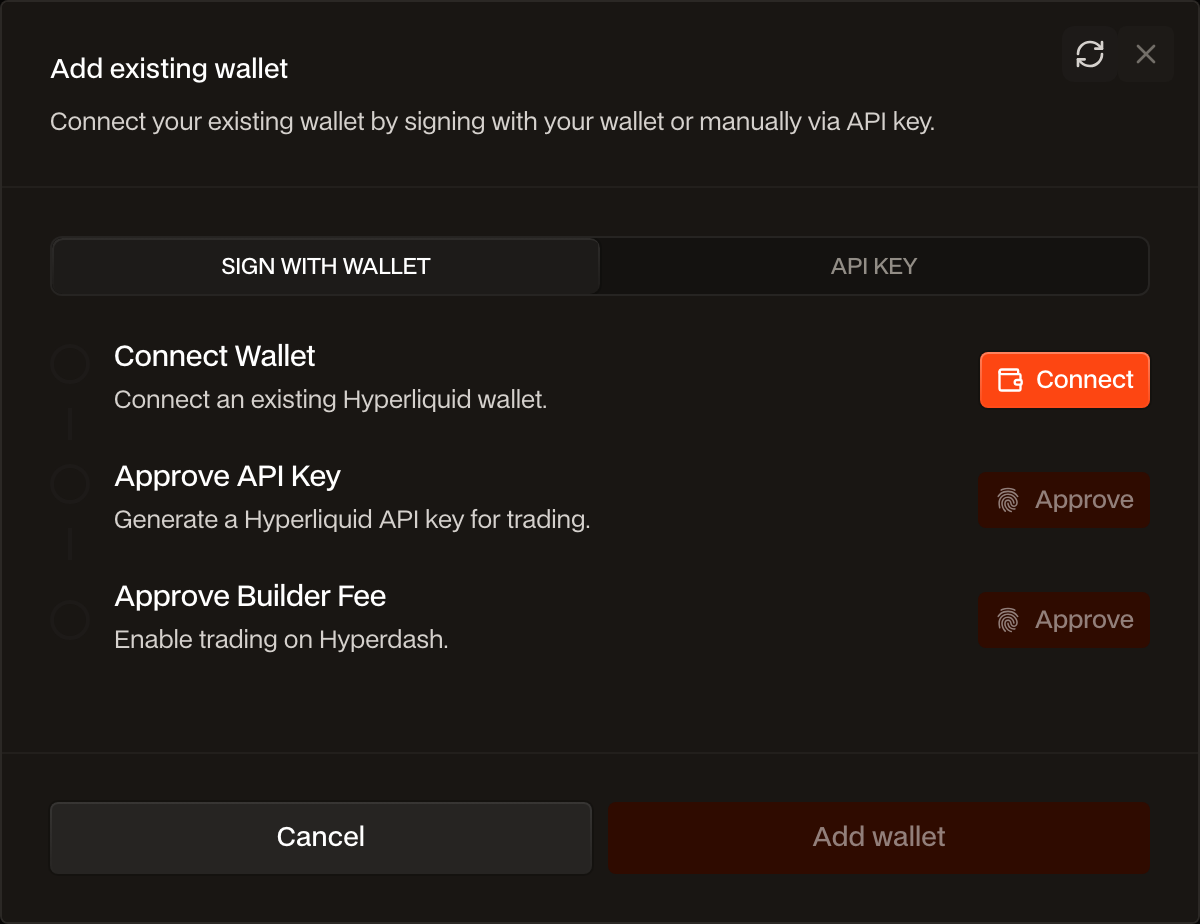
- The trading key can: place, change and cancel orders.
- The trading key cannot: withdraw or transfer your assets. Those actions require your own wallet’s signature.
For example, approving a trading key lets Hyperdash submit a limit order for you. It does not give that key permission to send your balance to another address. You can revoke the API wallet through Hyperliquid’s API page. See how Hyperdash trading permissions work.
This gives you a different custody relationship from an exchange account. It also makes your wallet security important: protect your sign-in, enable two-factor authentication, and keep recovery information private. Trading funds still depend on Hyperliquid’s infrastructure; non-custodial trading does not remove protocol, wallet or trading risk.
On-chain trading with a familiar sign-in
You do not need to arrive with a browser wallet or learn a new login process. Signing in to Hyperdash with Google, Apple or email creates a non-custodial wallet secured by Turnkey. If you already use an Ethereum-compatible wallet, you can connect it instead.
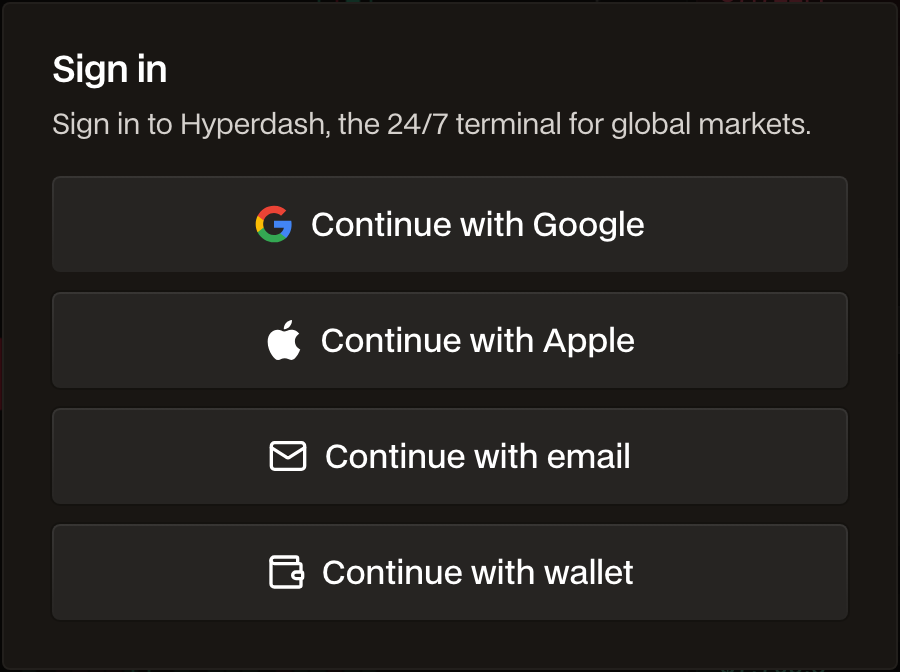
Enable a passkey or authenticator app in the Security settings. If you use an authenticator, save the backup recovery codes somewhere secure. Hyperdash also has a support contact at support@hyperdash.com for help with the product.
How to move funds from Binance to Hyperdash
A crypto transfer moves available funds. It does not transfer your Binance positions, open orders or trading history. Start with the amount you intend to use on Hyperdash and check the details before sending.
1. Sign in and open Deposit
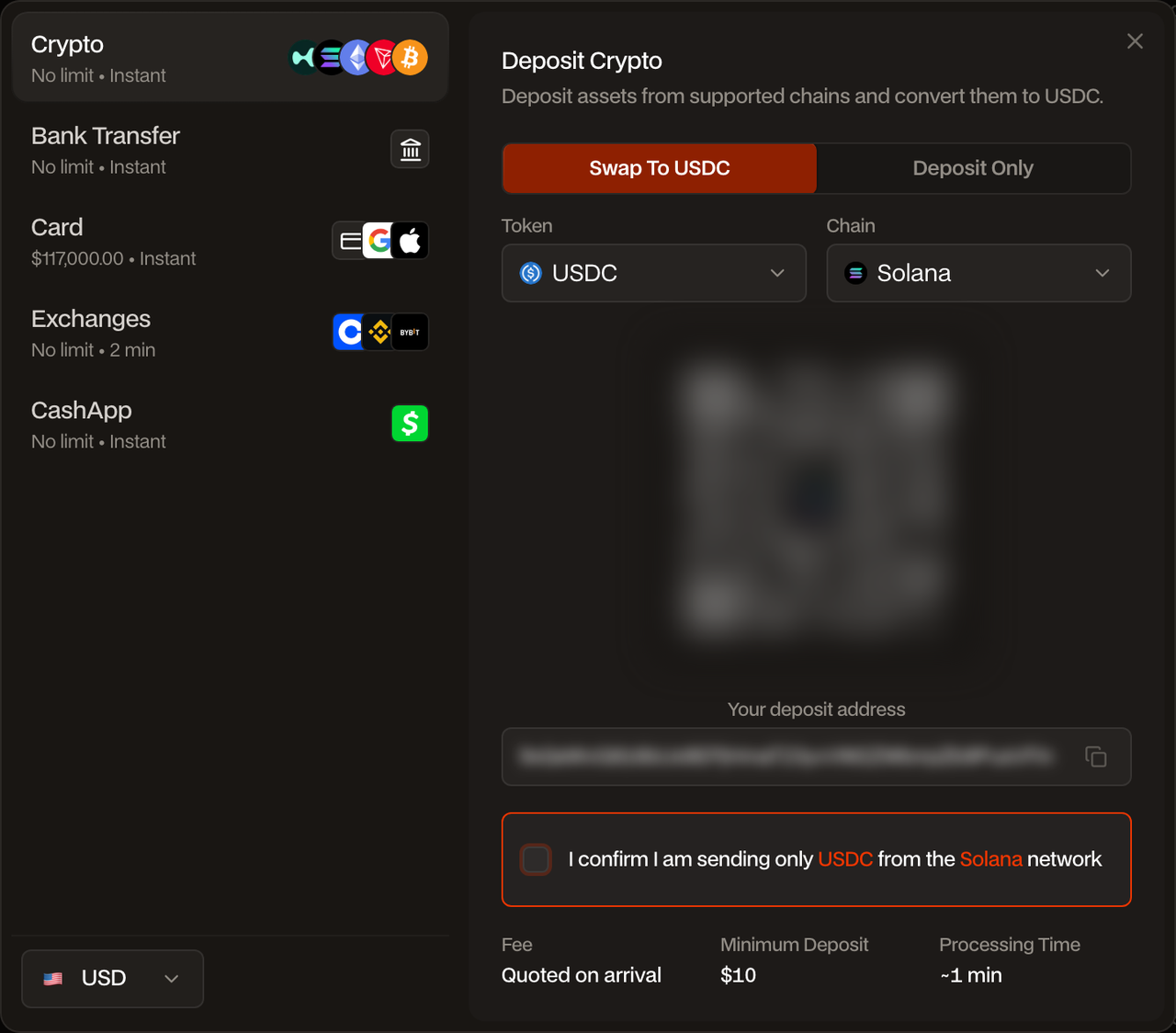
Open Hyperdash, sign in, and choose Deposit. Pick the asset and deposit method you want to use. The deposit window shows the applicable fee, minimum deposit and estimated processing time.
2. Choose a Binance deposit route
Connected exchange: choose the exchange deposit option and select Binance. Follow the prompts to connect your exchange account, review the transfer details and authorize the deposit. Use this route when it is available for your account.
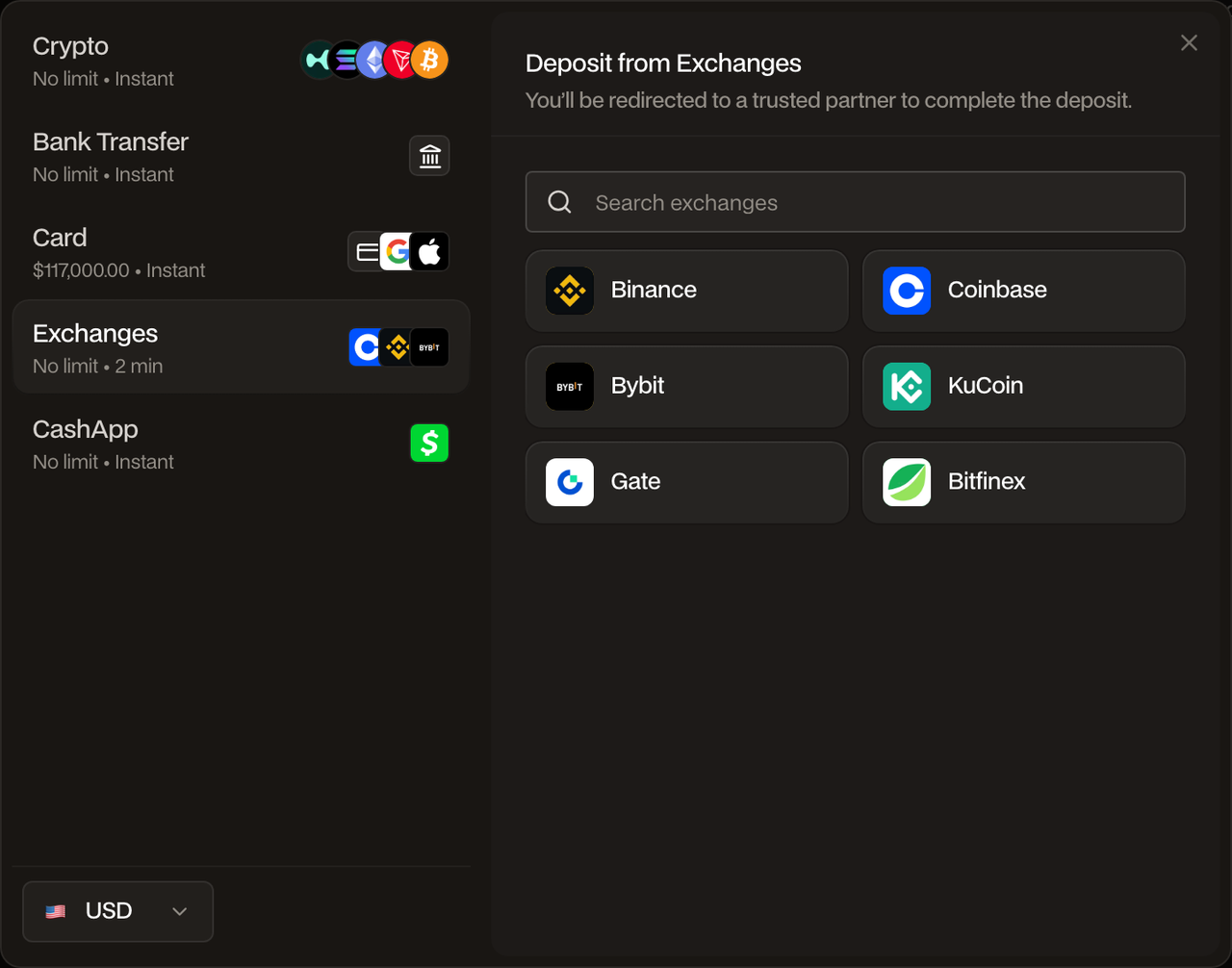
Manual crypto transfer: choose the wallet/exchange transfer option in Hyperdash, then select the exact asset and network you will send. Review the asset-and-network warning and reveal the receiving address. Copy that address from the deposit window.
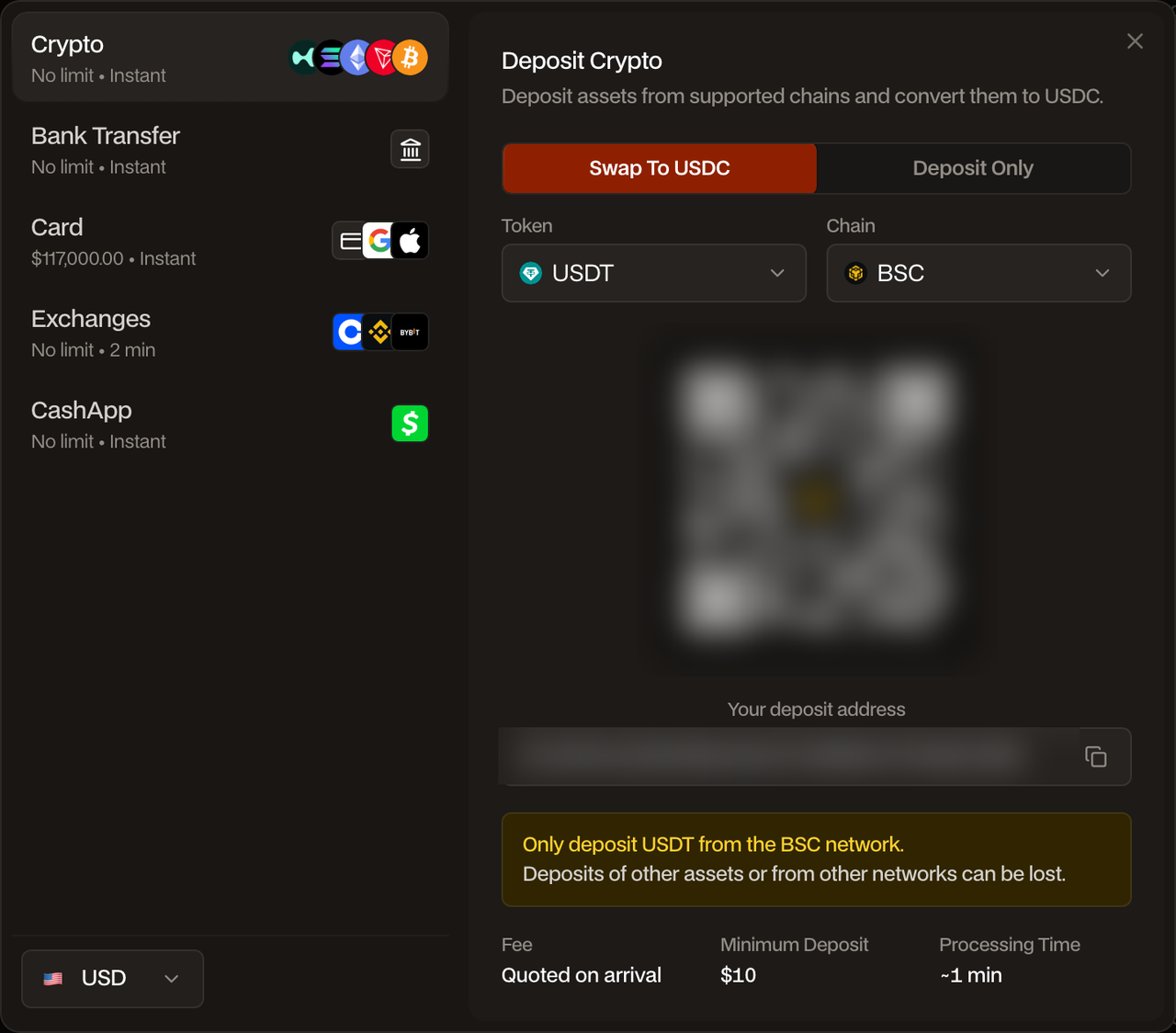
3. Match the asset and network on both sides
For a manual transfer, open the crypto withdrawal flow in Binance. Choose the asset, paste the Hyperdash deposit address and select the same network shown in Hyperdash. Check the address, asset, network, amount and withdrawal fee before completing Binance’s security checks.
An address that looks compatible is not enough. Several networks use the same address format, but the deposit route accepts the asset and network shown in the Hyperdash window. Do not reuse an address copied from a different deposit route.
4. Send a test deposit that meets the minimum
For a first transfer, use a small test amount that meets the displayed deposit minimum after the sending exchange’s fee. Wait for it to credit before sending more. Review the route again for the next transfer; fees, minimums and available networks can change.
Where offered, the deposit flow lets you choose between Deposit Only and Swap to USDC. Choose the option appropriate for the balance you want to trade with and review the conversion details. The deposit guide explains the supported routes and network checks.
5. Confirm your balance and set up trading
Once the deposit settles, check the credited balance and select the wallet you want to trade from. Complete any trading-wallet setup prompts, including approval of the API wallet and builder fee. Then choose your market and review the order size, price, fees and any leverage before submitting an order.
Keep the tools you need to trade
Changing custody should still leave you with a useful trading workspace. Hyperdash connects you to Hyperliquid’s order books and adds tools for researching markets and managing execution.
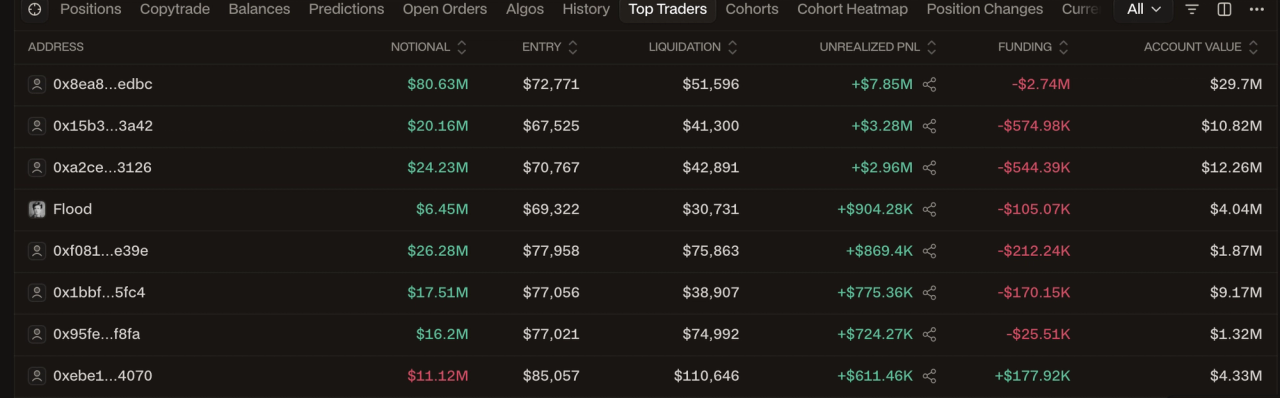
The market intelligence views show individual traders’ position sizes, entries, liquidation prices and PnL. You can also examine positioning by trader group and see how exposure changes over time. This makes the activity behind a market easier to inspect.
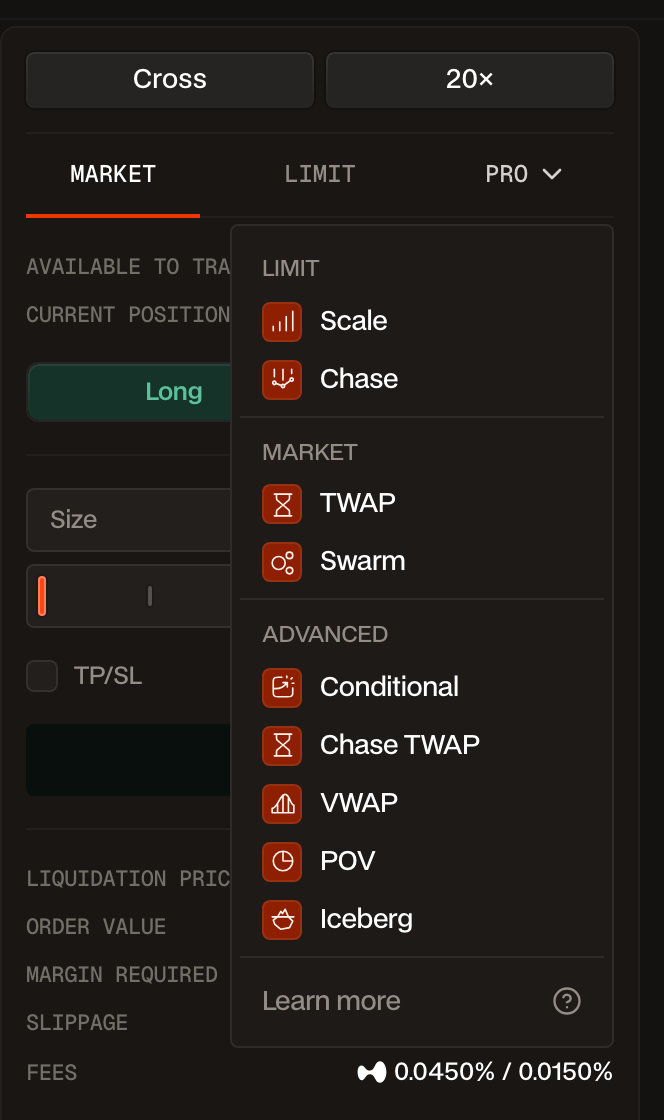
Execution tools include limit orders, take-profit and stop-loss orders, trailing stops, TWAP and Iceberg. TWAP spreads an order across time; Iceberg displays smaller portions of a larger limit order. The order-type guide explains when each tool is useful.
Before a larger trade, check the market’s current spread, available depth and estimated slippage for your order size. Liquidity varies by asset and market conditions. For a detailed feature and fee comparison, read Hyperdash vs Binance.
You can also add funds without using an exchange
Moving existing crypto does not require a bank withdrawal. If you later want to add new money, Hyperdash also offers bank and card deposits alongside supported local payment methods. Availability depends on your country, currency and payment provider; the deposit window shows the options available to you.
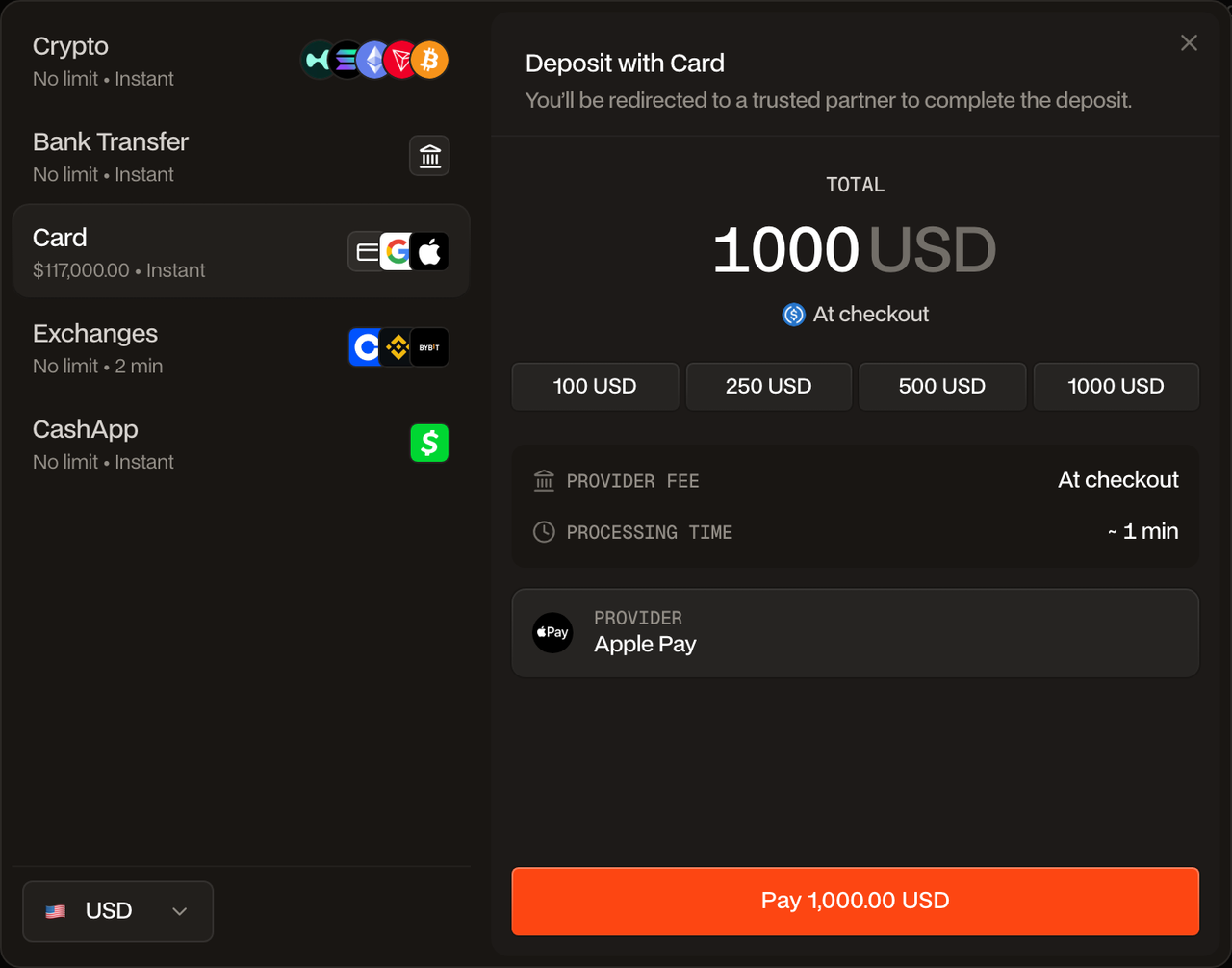
Bank-transfer setup requires identity verification. Review the quoted conversion, fee and processing estimate before paying. These cash deposit options give you another way to fund your wallet after your initial move from Binance.
Frequently asked questions
Is Hyperdash a Binance alternative for active traders?
Hyperdash is an option for traders who want wallet-authorized trading on Hyperliquid, visible on-chain market activity and advanced execution tools. Check that the markets and products you use are available before moving funds. Your Binance account, positions and order history do not carry over.
Do I need a wallet before signing up?
No. Google, Apple or email sign-in creates a non-custodial wallet secured by Turnkey. You can also connect an existing Ethereum-compatible wallet.
Can I transfer from Binance without withdrawing to my bank?
Yes. Use the connected Binance deposit option where available, or make a crypto withdrawal using an asset and network supported by both sides. Follow the receiving instructions in the Hyperdash deposit window.
Can Hyperdash move my money if Binance withdrawals are unavailable?
No. A transfer still depends on Binance processing the withdrawal. Hyperdash cannot release balances held by another exchange.
Does non-custodial mean my balance stays untouched in an external wallet?
No. Your trading balance is recorded on Hyperliquid under your wallet address and is used by its trading infrastructure. The key distinction is authorization: Hyperdash’s API wallet can trade, while withdrawals and transfers require your own wallet’s signature.
Make your first move on-chain
Start by opening Hyperdash and reviewing the deposit options for your account. Set up your wallet security, choose the Binance transfer route that fits, and confirm a small deposit before moving more. You can then explore the terminal and its market data with your own funded wallet.