The Ultimate Stack: Best Analytics and Trading Tools for Hyperliquid in 2026

June 9, 2026
By Hyperdash
In 2026, trading on Hyperliquid without dedicated analytics tools puts you at a structural disadvantage against sophisticated market participants. As Hyperliquid’s daily trading volume consistently surpasses $1.5 billion, the ecosystem of third-party tools built around its L1 has matured significantly. For serious traders, relying solely on the native exchange interface is no longer sufficient to spot alpha.
Published
June 9, 2026
Author
Hyperdash
Reading time
6 min read
Category
Tools & Data
Historically, traders had to stitch together a fragmented stack: one site for charts, another for whale tracking, a Telegram bot for alerts, and a separate interface to actually execute trades. Today, the landscape has consolidated. The most successful traders use comprehensive terminals that bring on-chain analytics and sub-50ms execution into a single unified workspace. This guide explores the five essential capabilities every Hyperliquid trader needs in 2026, and how Hyperdash integrates all of them into one professional terminal.
1. Liquidation Heatmaps: See Where the Market Will Move Before It Does
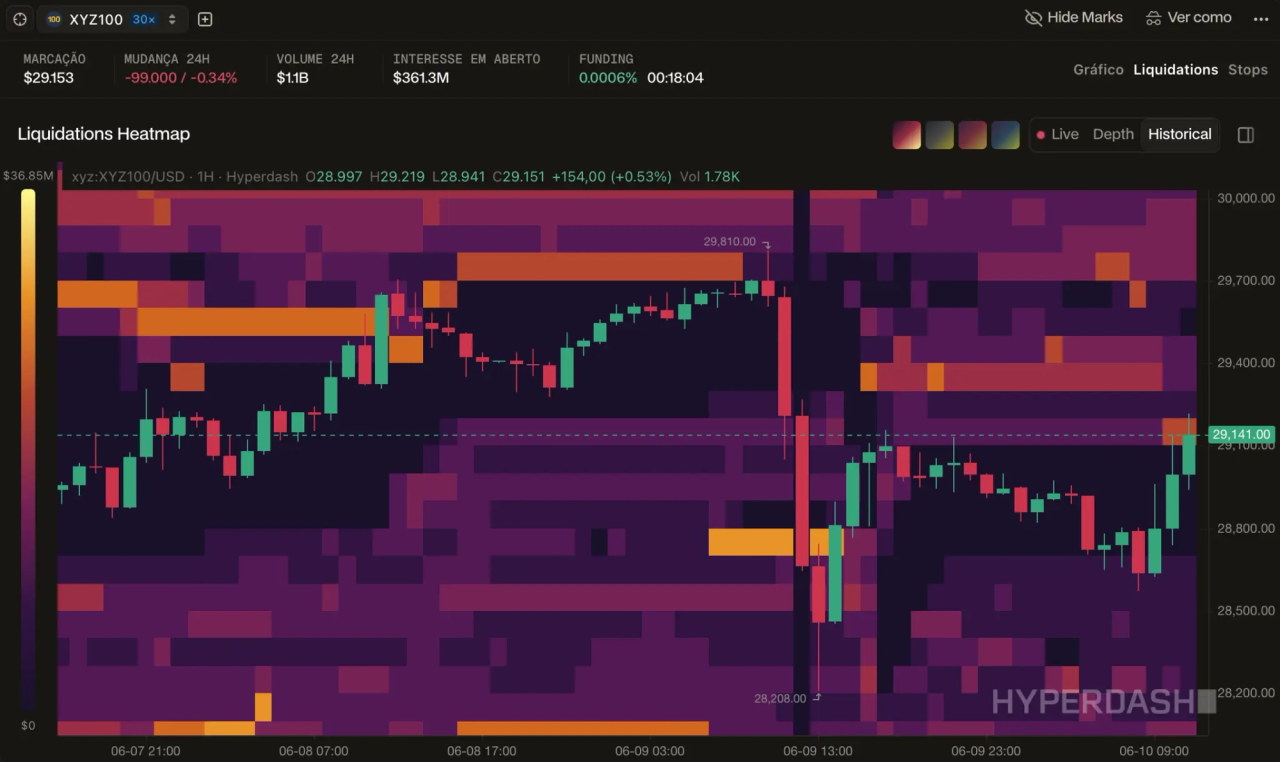
The most powerful tool in a perpetuals trader’s arsenal is not a moving average or an RSI, it is the ability to see where other traders are trapped. Liquidation heatmaps visualize the price levels at which over-leveraged positions will be forcibly closed, creating predictable pockets of volatility that sophisticated traders actively target.
Hyperdash Liquidations and Stops overlays are integrated directly into its native charting interface. The heatmap renders in real-time directly on top of the price chart, using a color gradient from dark purple (low liquidity) to bright orange and yellow (extreme liquidity concentration) to show precisely where stop clusters are resting. Traders can toggle between Live, Depth, and Historical views to understand both current positioning and how liquidity has shifted over time.
The critical advantage here is execution proximity. On competing platforms, a trader must view the heatmap on one tab and execute on another, introducing latency and decision friction. On Hyperdash, the moment a trader identifies a liquidity vacuum forming above a yellow band, they can place a limit order in the same interface without switching context. This is the difference between reading the market and trading it.
2. Wallet Cohorts: Understand What Smart Money Is Actually Doing
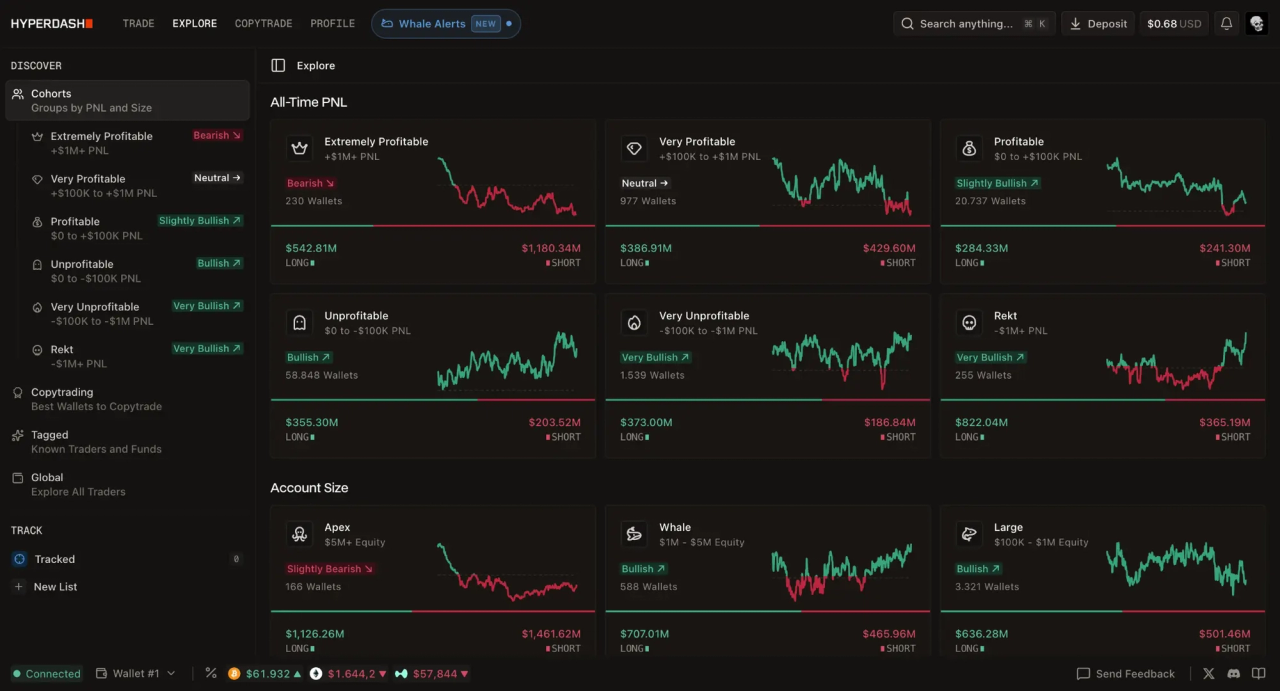
Tracking smart money on Hyperliquid requires more than finding one profitable wallet, it requires understanding the aggregate behavior of every profitable wallet simultaneously. This is what separates a whale tracker from a true market intelligence tool.
The Hyperdash Explore module segments the entire Hyperliquid user base into six PnL-based cohorts and five account-size cohorts, each updated in real-time:
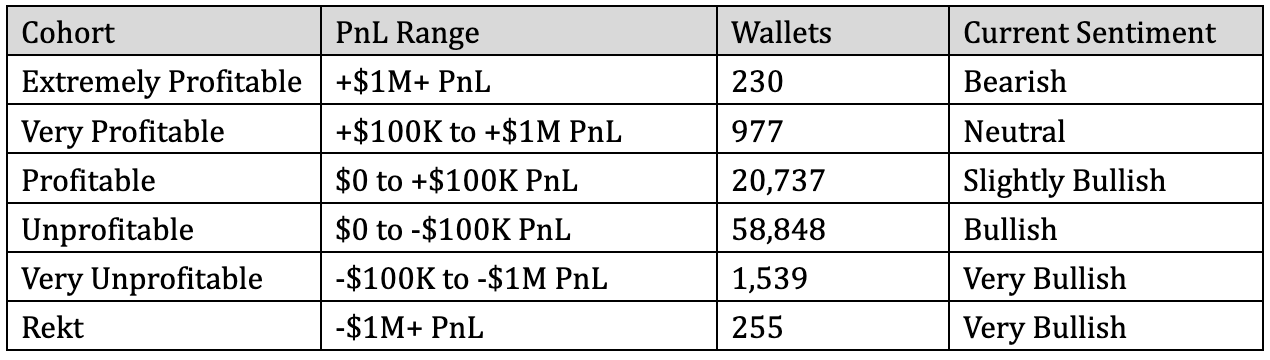
The divergence between the top and bottom cohorts is one of the most reliable contrarian signals available on-chain. When the “Rekt” cohort is positioned “Very Bullish” while the “Extremely Profitable” cohort is “Bearish,” the data is telling a clear story about where institutional positioning sits relative to retail sentiment. Traders can drill into any cohort to view individual wallets, tag known funds, build custom watchlists, and receive alerts the moment a tracked wallet changes its position.
3. Position Changes and Whale Alerts: React in Real Time
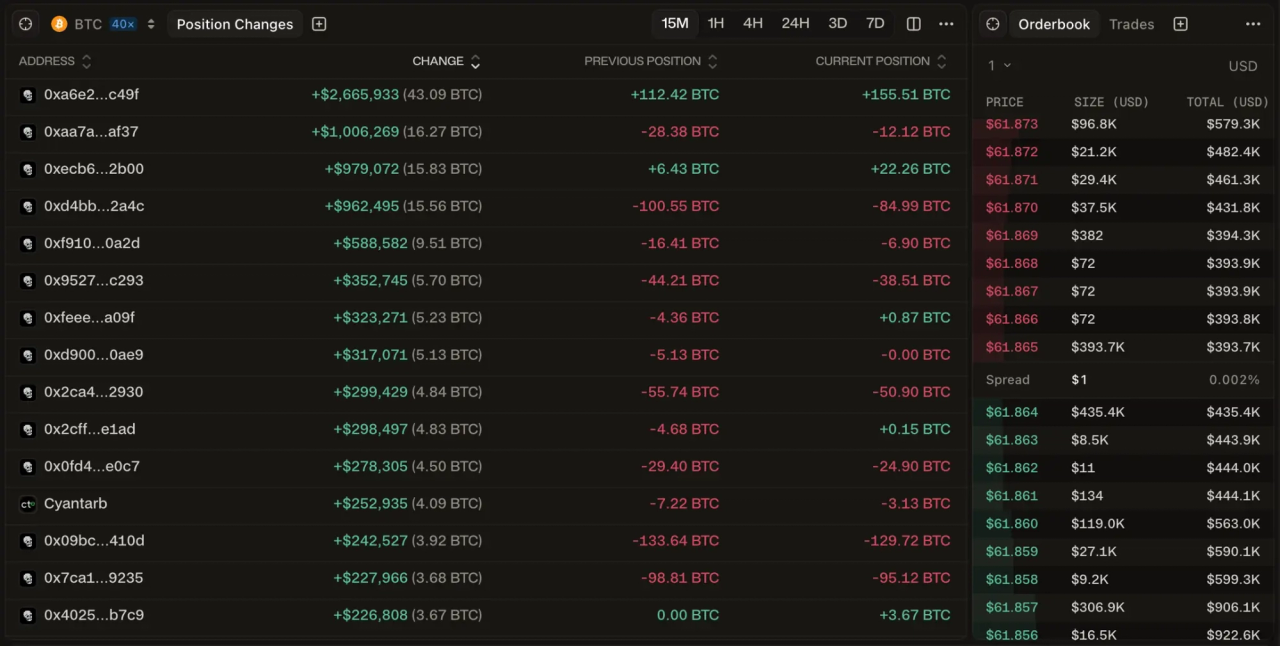
Knowing the aggregate positioning of smart money is valuable. Knowing the exact moment a specific whale adds $2.6 million to a BTC long is actionable. These are two different tools, and Hyperdash provides both.
The Position Changes widget streams a live feed of the largest position adjustments happening on Hyperliquid right now, sorted by dollar size. Each row shows the wallet address, the change in USD and BTC terms, the previous position, and the current position, giving traders a complete picture of whether a whale is adding to a conviction trade or reversing course. The feed is filterable by asset and time window (15M, 1H, 4H, 24H, 3D, 7D), allowing traders to zoom out for a macro read or zoom in for intraday flow.
Complementing this is the Whale Alerts feature, accessible directly from the main navigation bar. Rather than requiring traders to monitor the Position Changes feed continuously, Whale Alerts pushes real-time notifications when tracked wallets execute significant trades, ensuring that no major structural shift in the market goes unnoticed.
4. Copy Trading: Automate Your Edge
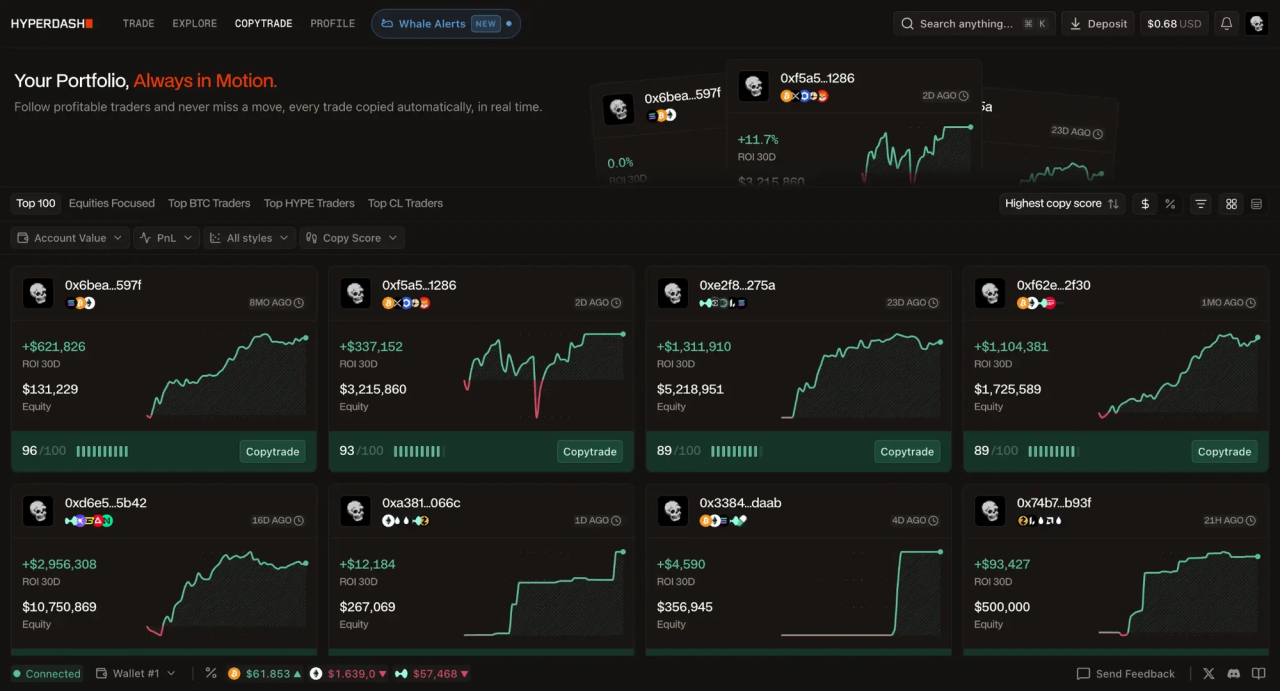
Hyperliquid’s 1-Click Trading architecture has enabled a new generation of low-latency copy trading that mirrors whale positions with near-zero slippage. The Hyperdash Copytrade module is built directly on top of this infrastructure, making it the most tightly integrated copy trading solution available for the protocol.
The leaderboard ranks traders by a proprietary Copy Score (out of 100), which weights consistency, drawdown, and trade frequency alongside raw PnL. This prevents the common failure mode of copy trading: blindly following a wallet that made one outsized leveraged bet. Traders can filter the leaderboard by asset focus, “Equities Focused,” “Top BTC Traders,” “Top HYPE Traders,” “Top CL Traders”, to find specialists whose strategy aligns with their own risk profile. The top-ranked wallet in the screenshot above carries a Copy Score of 96/100 with +$621,826 ROI over 30 days.
Because the copy trading engine runs on the same infrastructure as the manual execution terminal, follower orders are placed with the same sub-50ms latency as the original trade. This is the critical technical distinction: on platforms that use API-based copy trading via a third-party relay, slippage accumulates with every millisecond of delay. On Hyperdash, the gap between the leader’s entry and the follower’s entry is minimized by design.
5. The Modular Dashboard: Build the Terminal You Actually Need
No two trading strategies are identical. A scalper monitoring the 15-minute chart needs a different workspace than a macro trader tracking cohort sentiment across multiple assets. A rigid, one-size-fits-all interface forces traders to adapt to the platform rather than the platform adapting to the trader.
Hyperdash uses a fully modular, widget-based architecture. Every component, the Orderbook, TWAP execution, Cohorts feed, Top Traders, Position Changes, Balances, and Open Orders, can be dragged, dropped, resized, and arranged into a custom layout. Traders can save multiple layouts for different market conditions and switch between them in a single click. A Command Palette (accessible via keyboard shortcut) allows instant navigation to any action or market without lifting hands from the keyboard.
This level of customization is not cosmetic. It is the difference between a terminal that serves a strategy and a terminal that interrupts one.
Ready to upgrade your trading stack?
Open your Hyperdash account today using your wallet or email. Access sub-50ms latency execution, real-time liquidation heatmaps, and advanced cohort analytics built directly on top of Hyperliquid.
Frequently Asked Questions (FAQ)
What is the best analytics tool for Hyperliquid?
In 2026, Hyperdash is widely considered the best dedicated analytics terminal for Hyperliquid. It is the only platform that combines real-time liquidation heatmaps, wallet cohort analysis, whale alerts, copy trading, and direct order execution in a single interface.
How do I track whale wallets on Hyperliquid?
The Hyperdash Explore tab segments all Hyperliquid wallets into PnL-based and account-size cohorts. You can drill into any cohort, tag specific wallets, build custom watchlists, and activate Whale Alerts to receive real-time notifications when tracked wallets execute significant trades.
Can I copy trade on Hyperliquid?
Yes. The Hyperdash Copytrade module ranks top performers by a proprietary Copy Score and allows you to automatically mirror their positions. Because the copy engine runs on the same infrastructure as the manual terminal, follower orders are placed with the same sub-50ms latency as the original trade.
What is a liquidation heatmap and why does it matter?
A liquidation heatmap visualizes the price levels at which over-leveraged positions will be forcibly closed, creating predictable pockets of volatility. Hyperdash renders this data as a color-coded overlay directly on the price chart, allowing traders to identify liquidity vacuums and place orders against them without switching tabs.
Do I need a crypto wallet to use Hyperdash?
No. You can sign up with your Google account or email address. A wallet is only required if you prefer self-custodial access. Either way, you can deposit USDC and start trading within minutes.
Disclaimer: The information provided in this article is for educational purposes only and does not constitute financial advice. Trading perpetual contracts and leveraged equities involves significant risk. Always conduct your own research before deploying capital.